TrueNAS Home Lab
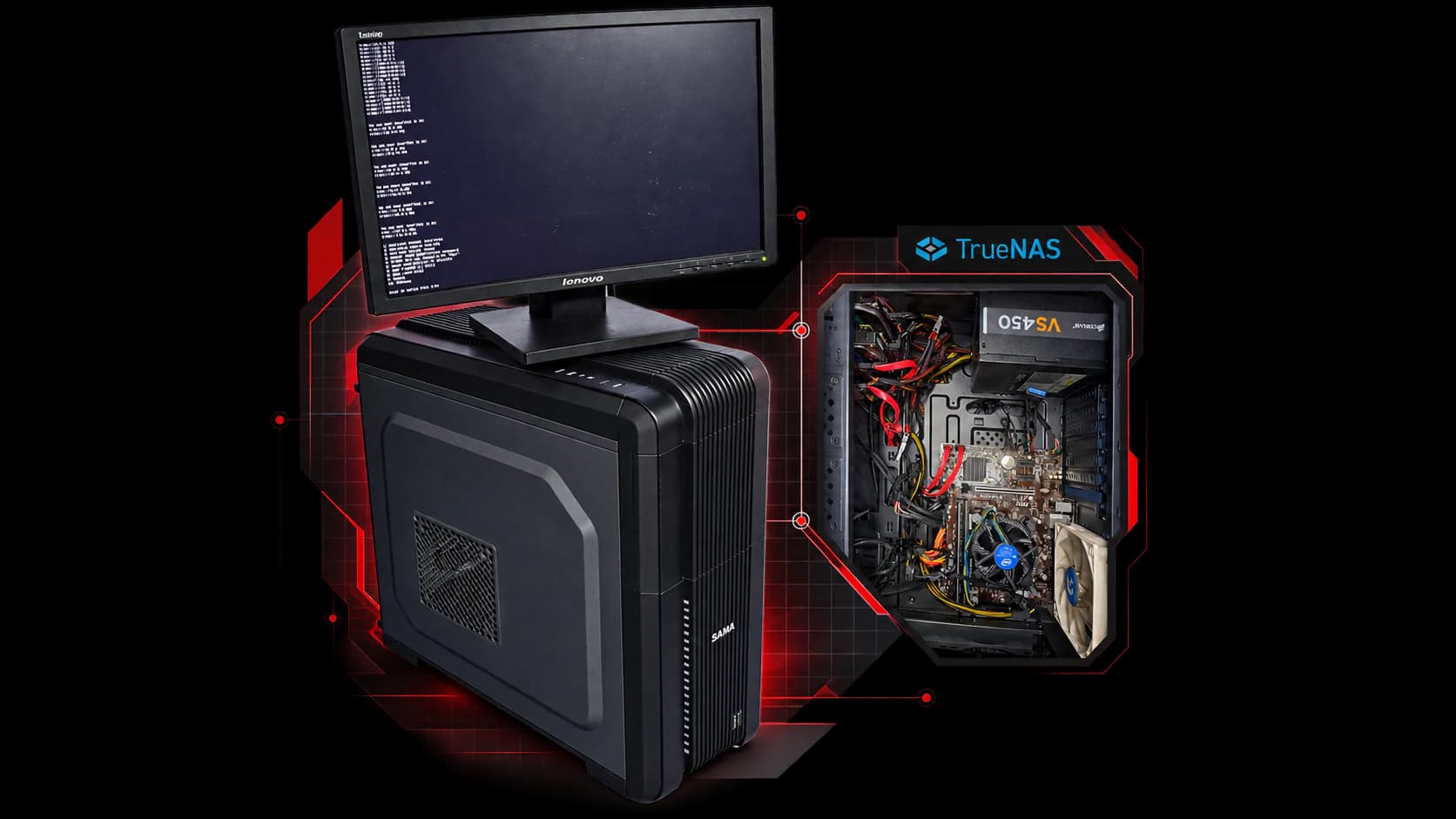
I repurposed an older desktop into a self-hosted storage and application server using TrueNAS SCALE, ZFS RAIDZ1, Immich and Nextcloud, and remote access that works without inbound port forwarding.
- Role
- Personal infrastructure project
- Status
- Ongoing
- Storage
- 3 × 1 TB HDD · ZFS RAIDZ1
- Services
- Immich · Nextcloud
- Platform
- TrueNAS SCALE on a reused desktop
Motivation
A cheap place for photos became a home lab
It started as a cheap place to keep photos and videos. I had an older desktop PC, and instead of buying a commercial NAS straight away, I wanted to see whether I could build my own storage server from hardware I already owned.
Once the storage layer was working, it became a way to learn how the rest of a home-lab stack fits together: datasets, applications, databases, DNS, tunnels, private networking and recovering from failure.
- Reuse hardware I already had instead of buying a NAS appliance first.
- Keep photos and videos on storage I run myself.
- Add general file storage and sync alongside the photo library.
- Learn storage, networking and server administration by operating a real system.
- Leave room to expand into later home-lab experiments.
Hardware · Real limits
Constraints shaped the build
I built the first useful version with the hardware I already had: an older desktop, three hard drives, no dedicated GPU and no spare SSD for application workloads. Every SATA port on the motherboard was already in use, and the whole system sits on an ordinary home network.
Waiting for ideal hardware would have meant not starting. I accepted HDD-backed applications, CPU-based photo processing and limited room for more drives, and let those constraints decide what to upgrade later.
Build the useful version first.
- Machine
- Reused desktopAn older PC, not purpose-built server hardware
- Drives
- 3 × 1 TB HDDCapacity first, on the drives I had
- GPU
- None dedicatedImmich’s machine learning runs on the CPU
- App storage
- No SSD poolApplications share the hard-drive pool
- Expansion
- SATA ports fullNo free onboard ports for more drives
- Network
- Home networkAn ordinary residential setup
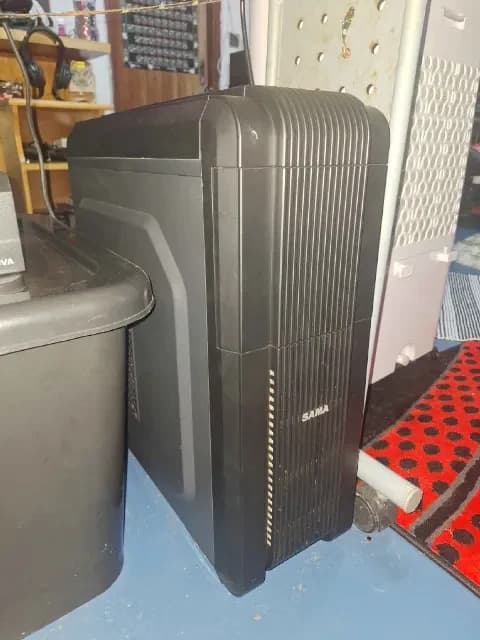
The physical home server. An ordinary machine, with plenty to learn from. 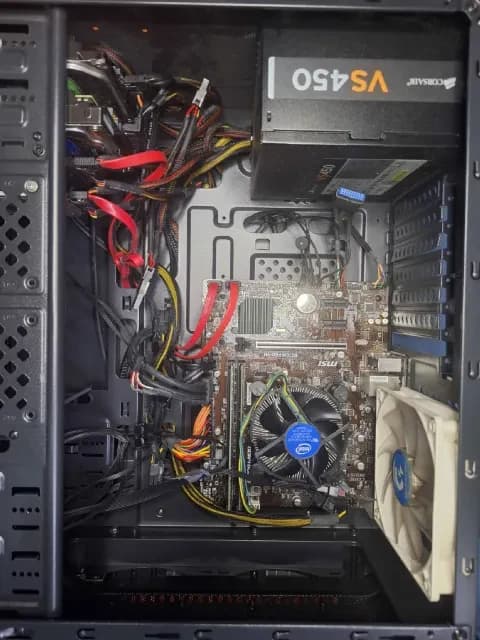
With the side panel off: the actual components and wiring inside the home server.
Platform decision
A storage-first platform
I considered building on Ubuntu Server, which would have meant assembling more of the storage and application layer by hand. Because this project was storage-first, I chose TrueNAS SCALE: it brings ZFS pool and dataset management, disk and storage health, snapshots, scrubs and application deployment together behind a browser interface.
The interface didn’t make the work automatic. Several problems still meant working in the shell, in configuration files and on the network.
- Considered
- Ubuntu Server: a more manual build of storage, health monitoring and apps.
- Chosen
- TrueNAS SCALE: ZFS management, health visibility, snapshots, scrubs and apps in one platform.
- Still required
- Shell access, configuration edits and network troubleshooting when things went wrong.
I chose a storage-focused platform first, then used its application layer to grow the NAS into a broader home-lab server.
ZFS · RAIDZ1
Three drives, one redundant pool
Storage came first. The three 1 TB drives form a single RAIDZ1 vdev inside a ZFS pool, so the pool can keep running if any one drive fails. TrueNAS showed about 1.58 TiB available at the time.
RAIDZ1 suited the goal of affordable, redundant bulk storage from the drives I already had. Datasets inside the pool then hold the applications and the data they serve.
- 3 × 1 TB HDDThe drives already in the machine
- RAIDZ1 vdevOne-disk redundancy across the three drives
- ZFS poolAbout 1.58 TiB shown available at the time
- DatasetsOrganised storage inside the pool
- ApplicationsImmich, Nextcloud and their databases
- User dataPhotos, videos and files
Redundancy ≠ backup
RAIDZ1 is not a backup
RAIDZ1 protects the pool from a single drive failure, but it does not protect against accidental deletion, malware, catastrophic hardware loss or every form of pool failure. A separate backup remains part of the future reliability work.
Trade-off
Capacity now, speed later
Hard drives came first because the capacity was cheaper, the drives already existed and the server could be useful immediately.
The compromise is that application workloads live on the same spinning disks as the bulk data: databases, metadata, thumbnails and caches all share HDD-backed storage. A dedicated SSD tier for applications is the natural next step, and TrueNAS’s own guidance recommends SSD storage for the apps pool. It is planned, not installed.
Performance optimisation didn’t have to block the first useful version.
One HDD pool
RAIDZ1 HDD pool
- Bulk files
- Photos and videos
- Application data
- Databases
- Metadata, thumbnails and cache
Two storage tiers
HDD tier
- Bulk files
- Photos and videos
- Large user data
SSD application tier
- Databases
- Application configuration
- Metadata and thumbnails
- Cache
Immich · Nextcloud
From NAS to application platform
With storage in place, TrueNAS Apps turned the NAS into an application platform. Two containerised, self-hosted services put the storage to everyday use.
Immich handles photo and video backup and browsing, with a real library stored on the server. There was no dedicated GPU, so it used the CPU-based machine-learning path rather than GPU acceleration. I configured it for the hardware I actually had instead of delaying the project until GPU acceleration was possible.
Nextcloud provides general file storage and sync through the browser and its apps. Its app stack runs with PostgreSQL as the database and Redis as the cache, which mattered later when it failed.
- Immich
- Photo and video backup and browsing · CPU machine learning · remote access through Cloudflare Tunnel
- Nextcloud
- General file storage and sync · PostgreSQL · Redis · browser access through Cloudflare
- TrueNAS Apps
- Containerised deployment on the same ZFS pool

Cloudflare Tunnel · Tailscale
Remote access without port forwarding
The services stay on the home server while Cloudflare Tunnel provides the public HTTPS path. The tunnel is an outbound connection from the server to Cloudflare’s edge, so the application ports did not need to be opened to the Internet through inbound port forwarding.
That makes it self-hosted storage and applications with managed edge access, not a system independent of third parties: public access relies on Cloudflare. Remote access to Immich and browser access to Nextcloud worked through the tunnel, with one mobile-client gap left open.
I also tested Tailscale as a private access layer. It was useful for private network reachability, while Cloudflare Tunnel became the working browser-access path for the hosted web services.
- Internet clientA browser, away from home
- Link: HTTPSCloudflare edgePublic hostname and DNS
- Link: Routed to the tunnelCloudflare TunnelConnection opened outbound by the server
- Link: No inbound port forwardingTrueNAS SCALEThe services stay on the home server
- ImmichPhotos and videos
- NextcloudFiles
Addresses, ports, hostnames and tunnel identifiers are deliberately left out.
Cloudflare Tunnel
- Public web-service access
- HTTPS hostnames for the hosted services
- Remote access to Immich; Nextcloud in the browser
Tailscale
- Private network reachability
- Administration and LAN-style testing
- Not the public path for the web services
Debugging a multi-service failure
The database wasn’t the problem
After I edited Nextcloud’s configuration, the service broke: the browser showed an internal server error and the main Nextcloud container stayed in Starting / Deploying.
Instead of treating the whole stack as broken, I looked at each workload. PostgreSQL and Redis were still healthy; only the application container was not. That narrowed the failure to the application and configuration layer, so the change I had just made was the first thing to check. Re-reading the edit exposed a typo, and restoring valid configuration brought Nextcloud back.
SymptomInternal server error · Nextcloud stuck in Starting / Deploying after a configuration edit
Workload health
- PostgreSQLHealthyDatabase container healthy
- RedisHealthyCache container healthy
- NextcloudFailingApplication container never finished starting
Reasoning
- Narrow the layerHealthy dependencies point at the app or its configuration
- Check the latest changeThe configuration edit made just before the failure
- Find the causeA typo in the edited configuration
- Restore and re-testValid configuration back, service checked again
ResolvedNextcloud started and responded again
What it shows
- Isolate the healthy components first.
- Narrow the failing layer before changing anything else.
- Check the most recent change.
- Don’t blame services that are still healthy.
- Restore, then re-test.
Lessons from running it
What operating it taught me
The most useful lessons came from operating the server rather than installing it: something changed unexpectedly, broke after an edit or didn’t quite work from outside the house.
I built it while learning the technologies involved. Documentation, online research, YouTube tutorials and AI-assisted troubleshooting helped me understand each unfamiliar concept, implement it on the real hardware, watch what happened and work back through whatever broke.
- Redundancy is not backup
- RAIDZ1 survives a failed drive, not deletion, malware or losing the whole machine.
- Health narrows the fault
- Checking each workload turned “Nextcloud is broken” into one failing layer.
- Stable addressing matters
- The server’s address changed unexpectedly during setup. Services others depend on need deliberate addressing.
- Ports are not endpoints
- An app’s internal port is not its public HTTPS address; the tunnel maps a public hostname to a private service.
- Constraints set the order
- HDDs before SSDs and CPU before GPU: real bottlenecks decide the upgrades.
Current system · next iteration
Where the first version is limited
This is a personal home lab on modest hardware. Its limits are specific, and each one points to the next change rather than being hidden.
| Area | Current system | Next iteration | State |
|---|---|---|---|
| Backup | RAIDZ1 redundancy only; no independent backup confirmed | A separate backup target outside the pool | Planned |
| App storage | Apps, databases, metadata and caches run on the HDD pool | A dedicated SSD application tier | Planned |
| Expansion | Every onboard SATA port is in use | An HBA or other added SATA connectivity | Planned |
| Acceleration | No dedicated GPU; Immich machine learning runs on the CPU | A GPU, only if real workloads justify it | Possible |
| Remote clients | Browser access worked; the Nextcloud mobile app’s remote path was unresolved | Investigate and fix the mobile-client path | Planned |
Open issue
Nextcloud’s mobile app through the tunnel
Browser access through the reverse tunnel worked, and the mobile app worked on the local network. Remotely, the mobile client still exposed a compatibility or configuration issue. Reverse-proxy deployments can require additional client and proxy configuration, but the exact cause was never proven. I left it as a next-iteration item rather than pretending the remote-access path was finished.
Planned · possible
The next iteration
The upgrade path follows the real bottlenecks rather than a wish list. Beyond the limits above, a few reliability steps are planned, and some application ideas remain possibilities, not commitments.
- First version · builtThree HDDs in RAIDZ1, apps on the same pool, public access through a tunnel
- Next · plannedSSD application tier, more SATA connectivity and an independent backup
- Later · possibleMore services and compute once real use justifies them
Reliability
- Verify snapshot, scrub and SMART schedulesPlanned
- Monitoring and alertsPlanned
- A UPSPossible
Applications
- JellyfinPossible
- VaultwardenPossible
- Local AI and LLM experimentsPossible
Networking
- Refine the private administration pathPlanned
Outcome · reflection
What it became
What began as a cheap place for photos became a working self-hosted platform on a reused desktop: redundant ZFS storage, a photo and video library in Immich, a browser-accessible personal file cloud in Nextcloud and remote access to both through Cloudflare Tunnel.
It is deliberately a personal home lab rather than a finished appliance: it holds real data, runs services I actually use and gives me a platform I can keep improving as I learn more. An independent backup is not in place yet, and the upgrades above stay planned until they are built.
I also learned that I don’t need to know every part of a system before I start. Documentation, tutorials, AI-assisted troubleshooting and testing helped me understand each layer as I reached it. If I rebuilt the server today I would have to look some details up again, but I know how the architecture fits together and how to work my way back through it.
- Storage
- A redundant ZFS RAIDZ1 pool
- Photos
- An Immich photo and video library
- Files
- A Nextcloud file cloud in the browser
- Access
- HTTPS through Cloudflare Tunnel
- Next
- An expandable base for future home-lab work
The biggest lesson was that infrastructure is mostly trade-offs. I could wait for the ideal hardware, or build a useful first version and let real bottlenecks tell me what to upgrade next.